All Honda Pilot Dashboard Warning Light Symbol Explained
You’re driving along, and a red or yellow light suddenly lights up on your Pilot’s dashboard screen. Your first thought is probably, what does that mean, and do I need to pull over right now?
You’re not alone — it happens to every Pilot owner sooner or later.
This guide walks through every warning light and indicator symbol you’ll find on the Honda Pilot dashboard across all four generations (2003–2026), including what each one looks like, what it means, and what to do when it lights up.
Dashboard Symbol List
Below is the full list of Honda Pilot dashboard symbols and warning lights covered in this guide.
Click any symbol to jump straight to its explanation.
12-Volt Battery Charging System Indicator

A red battery icon with a minus and plus symbol.
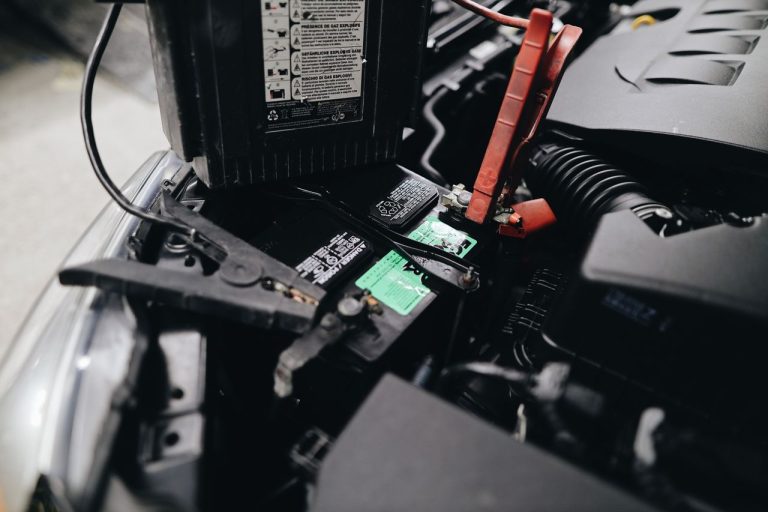
This light means the charging system isn’t putting enough voltage into the 12-volt battery.
It’s usually caused by a weak or aging battery, a failing alternator, or a loose/corroded connection.
Check the battery as soon as you can. If the light comes on while you’re driving, don’t shut the engine off if you can help it — a badly discharged battery may not have enough power to restart the car.
Engine Oil Pressure Indicator

A red oil can icon dripping a drop of oil, with wavy lines underneath.
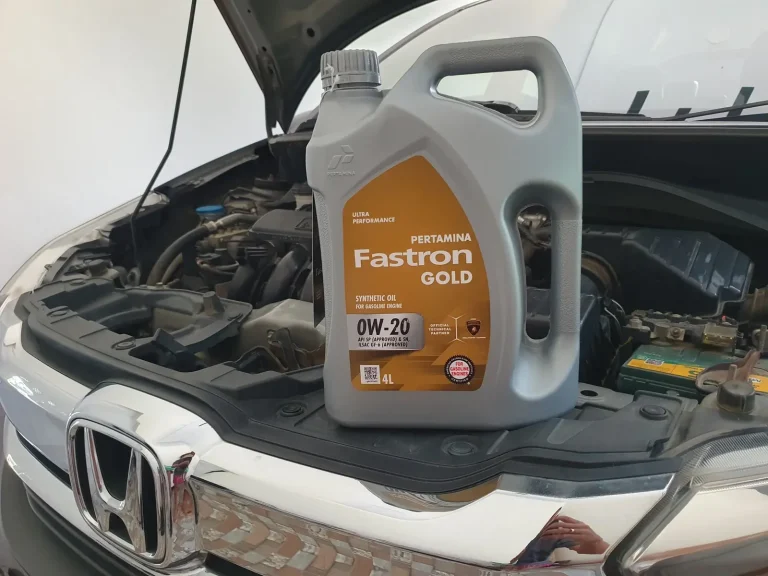
This is a serious one. It means engine oil pressure has dropped too low, often because the oil level itself is low. If it comes on while driving, pull over on level ground right away.
Shut the engine off, let it sit for a few minutes, then check the level with the dipstick and top it up if it’s below the minimum mark.
Restart the engine and see if the light clears. If it stays on for more than a few minutes, stop driving and call a dealer or mechanic — continuing to drive with low oil pressure can destroy the engine quickly.
Engine Oil Pressure Warning

The same oil can icon, but paired with an exclamation mark instead of wavy lines.
This variant usually points to a fault with the oil pressure sensor itself rather than the oil level. It’s worth having a technician check it out even though it isn’t necessarily as urgent as the standard oil pressure light.
Anti-lock Brake System (ABS) Indicator

The letters “ABS” inside a circular brake-caliper outline, in red.
This tells you there’s a fault somewhere in the anti-lock braking system. Regular braking still works, but you’ll lose the anti-lock function, which matters most on wet or slippery roads. Get it looked at by a dealer soon.
Door Open Indicator

A red top-down icon of a car with both doors shown open.
Comes on whenever a door, the liftgate, or the fuel door isn’t fully latched. It goes off as soon as everything is closed properly. If it pops up while you’re moving, pull over and check all the doors.
Electric Power Steering (EPS) Indicator

A red steering wheel icon with an exclamation point beside it.
This flags a problem with the electric power steering system. If you see it while driving, find a safe spot to stop, then restart the vehicle. If the light doesn’t clear, have it inspected — sometimes it’s paired with a “do not drive” message, in which case stop immediately and call the dealer.
Engine Cooling System Indicator
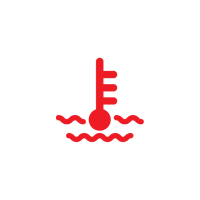
A red thermometer icon sitting above wavy lines.
This means the engine is running hotter than it should, typically from low or contaminated coolant. Pull over immediately and pop the hood to help it cool.
Once it’s safe to check, look at the coolant reservoir — if it’s below minimum, top it off with the correct Honda coolant type once the engine has cooled. Regular coolant checks help you avoid this altogether.
SRS Airbag Indicator

A red icon of a seated person with an airbag deploying in front of them.
This lights up briefly as a self-check every time you start the Pilot. If it stays on, there may be an issue with the airbags, side curtain airbags, or seat belt tensioners. Have it checked by a dealer as soon as possible — this is a core safety system.
Seat Belt Reminder

A red icon of a person wearing a seat belt.
Flashes and chimes when the power is on and the driver (or front passenger) hasn’t buckled up. It’ll keep reminding you until the belt is fastened. Very light objects in the passenger seat usually won’t trigger it, but children should always ride in the back regardless.
Check Engine / Malfunction Indicator
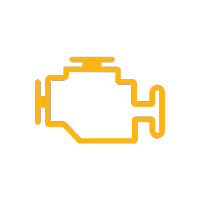
An orange/yellow outline of an engine.
One of the most nerve-wracking lights to see, but it covers a wide range of issues — from a loose gas cap to a real emissions or engine problem.
This indicator will light up briefly when the ignition is in the “accessories” position and turn off when the car is started. If this indicator is on while the engine is running, it means something is wrong.
If it’s flashing rather than solid, that usually means active misfiring: pull over, shut the engine off, restart it, and if it flashes again, drive gently to the nearest dealer.
A solid, steady light is less urgent but should still be scanned soon.
Vehicle Stability Assist (VSA) Indicator

An orange car icon with wavy skid lines underneath.
Blinks when VSA is actively working to keep the vehicle stable — that’s normal. A steady light means there’s a fault with VSA, hill start assist, or related systems, and it should be checked by a dealer. It can also appear briefly after the 12-volt battery has been disconnected; a short drive over about 12 mph often clears it.
Vehicle Stability Assist Off Indicator

The same car-and-skid-lines icon, with the word “OFF” underneath.
Simply confirms that VSA has been manually switched off.
Tyre Pressure (TPMS) Indicator

An orange horseshoe-shaped tire icon with an exclamation mark in the middle.
Means one or more tires are significantly under-inflated, or that the TPMS system itself needs attention. Check and correct your tire pressures first.
If it blinks for about one minute, and then stays on if there is a problem with the TPMS with Tire Fill Assist, or when a spare tire is temporarily installed.
Washer Fluid Level Indicator

An orange windshield-wiper spray icon.
A simple reminder that your washer fluid reservoir is running low. Top it up so you can keep the windshield clean — driving with poor visibility is more dangerous than it sounds.
Turn Signal and Hazard Warning Indicator

Orange arrows pointing left and right.
Blinks in sync with your turn signal lever or hazard button. If it doesn’t blink at all, or blinks unusually fast, have the bulbs and wiring checked — a fast blink rate is a classic sign of a burnt-out signal bulb.
Adaptive Cruise Control with Low Speed Follow Indicator

An icon of a car with a speedometer dial and a small arrow.
If it comes in amber color, it indicates a fault with ACC and Low Speed Follow — the feature that keeps pace with traffic down to a stop.
It can also flash briefly if you’re over the vehicle’s maximum load limit, or after a 12-volt battery disconnect (a short drive usually clears it). If it stays lit under normal conditions, have it inspected.
When it comes in white when you press the Adaptive Cruise Control button. Lights up in white and green if no vehicle is detected ahead of you while ACC with Low Speed Follow is in operation.
It will light up in green if a vehicle is detected ahead of you while ACC with Low Speed Follow is in operation.
Adaptive Cruise Control (ACC) Indicator

The letters “ACC” in green.
This is the standard indicator that lights up in green once you’ve engaged Adaptive Cruise Control — it’s simply confirming the system is active, not a warning.
Auto Idle Stop System Indicator

A letter “A” wrapped in a circular arrow.
Represents the Auto Idle Stop (auto start-stop) system, which shuts the engine off briefly at stops to save fuel.
Green means it’s working normally; amber means there’s a fault with the system.
Blind Spot Warning Light

Two cars with curved signal lines between them, in orange.
Lights up along with a message when there’s an issue with the Blind Spot Information System — this could mean the system is switched off, that mud/snow/ice is blocking a sensor, or that there’s an actual fault to have checked.
Collision Mitigation Braking System (CMBS) Indicator

Two cars about to collide with a starburst and a left-pointing arrow, in orange.
Signals a problem with the forward collision mitigation system — the feature that can automatically apply the brakes if a collision looks imminent.
If it lights up outside of a start-up check, get the sensors and system inspected, since this affects a key safety feature.
Road Departure Mitigation Indicator

A yellow car drifting between a dashed lane line and a solid lane line.
Indicates an issue with the Road Departure Mitigation system, which helps steer or brake the Pilot back if it starts drifting out of its lane. Have it checked if the light stays on, since dirty or obstructed sensors are a common, easy-to-fix cause.
Daytime Running Light (DRL) Indicator

The letters “DRL” in orange.
Just confirms your daytime running lights are active — an extra visibility feature, not a fault indicator.
Low Fuel Indicator

A yellow fuel pump icon.
Comes on when you’re down to roughly the last couple of gallons in the tank. Refuel when convenient.
If it’s flashing instead of staying steady, there may be a fuel gauge sensor issue worth having checked.
Power System Indicator

An orange badge reading “POWER SYSTEM.”
Found on hybrid Pilot models — this points to a problem with the hybrid electric system or elevated high-voltage battery temperature. Have the vehicle inspected by a dealer, since this can be a serious issue.
Ready Indicator

An orange badge reading “READY.”
Also a hybrid-specific indicator. It appears once you start the vehicle and confirms the hybrid system is ready to drive — this is a normal, positive indicator, not a warning.
Safety Support Indicator

An orange rounded badge with a white top-down car icon.
Covers a group of driver-assist safety features together (Road Departure Mitigation, CMBS, Blind Spot Information, and low-speed braking, depending on model year).
- Amber: points to a fault in one of those systems, or a blocked/dirty sensor — have it checked.
- Green: all the related safety features are switched on.
- Green and gray, or all gray: one or more of those features have been manually turned off.
Smart Entry System Indicator

An orange key-and-lock icon.
Lights up if there’s an issue with the Smart Entry (keyless) system or the push-button start system.
Transmission Temperature Too Hot Indicator
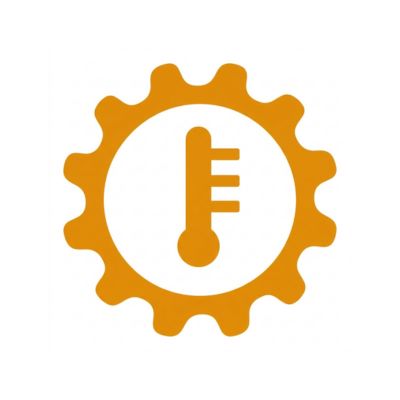
An orange gear icon with a thermometer in the center.
Means the transmission fluid has gotten too hot, often from towing, heavy loads, or extended hard driving. Pull over and let things cool down before continuing; if it keeps happening under normal conditions, have the transmission checked.
Automatic Brake Hold Indicator

A green badge reading “HOLD.”
Appears after you press the Brake Hold button, showing that the system is actively holding the brakes at a stop — handy in traffic or at lights. It releases automatically once you press the accelerator.
Automatic Brake Hold System Indicator

A green outlined badge reading “BRAKE HOLD.”
Confirms that the Automatic Brake Hold system itself is switched on and available to use.
Econ Mode Indicator

A green sprouting-leaf icon next to “ECON.”
Lights up when Econ mode is engaged — this adjusts throttle response and climate control to favor fuel economy.
EV Mode Indicator

Green “EV” letters.
Found on hybrid Pilot models, confirming the vehicle is running on electric power alone, with the gas engine switched off.
Normal Driving Mode Indicator

A black badge reading “NORMAL.”
Shows you’re in the Pilot’s default drive mode, active whenever the vehicle starts unless another mode is selected.
Snow Mode Indicator

A black badge reading “SNOW.”
Confirms Snow mode is active — useful for extra traction control on slick or snowy roads.
Sport Driving Mode Indicator

A black badge reading “SPORT.”
Lets you know Sport mode is engaged, which sharpens throttle response and shift behavior for a livelier drive.
Hill Descent Control System Indicator

A black icon of a car on a downhill slope line.
Indicates the Hill Descent Control System, which helps control speed on steep descents without you riding the brake pedal. It shows white when the system is on and ready, and green when it’s actively working.
Transmission System Indicator

A stylized “D” with a gear-like design behind it.
Points to an issue with the transmission. If it’s flashing or shows up with a “do not drive” message, stop safely and contact a dealer right away rather than continuing on.
Shift Position (Drive) Indicator

A simple letter “D.”
Just shows which gear you currently have selected — in this case, Drive.
Lights On Indicator

A teal/turquoise headlight-beam icon with light lines on both sides.
Confirms your exterior lights — parking lights, tail lights, or headlights — are switched on.
High Beam Indicator

A blue headlight-beam icon with light lines on one side.
Lights up whenever the high beams are active.
Auto High Beam Indicator

The same blue headlight icon with a letter “A” beside it.
Shows that Auto High Beam is engaged — the system automatically switches between high and low beams based on oncoming traffic and ambient light.
Frequently Asked Questions
This guide covers Honda Pilot model years 2003 through 2026. Symbol appearance can vary slightly by generation and trim, but the meanings above hold true across the lineup.

a cat lover, Honda driver, automotive enthusiast, and occasional photographer.
Nurjati is a proud Honda SUV owner and passionate content creator dedicated to sharing expert insights about full-size family SUVs.
His first car in school was a Honda, and she’s been in love with the brand ever since. With over 10 years of experience as a journalist and automotive blogger, Nurjati is committed to keeping enthusiasts and buyers informed and inspired.